In your DayZ Dedicated Server
Here's the guide on setting up automatic restarts with warning messages on your Imperium Hosting DayZ server:
- Open the Game Panel Scheduled Tasks.
- Create a New Scheduled Task.
- From the drop-down menu, choose Console/RCON Command and click on the New link.
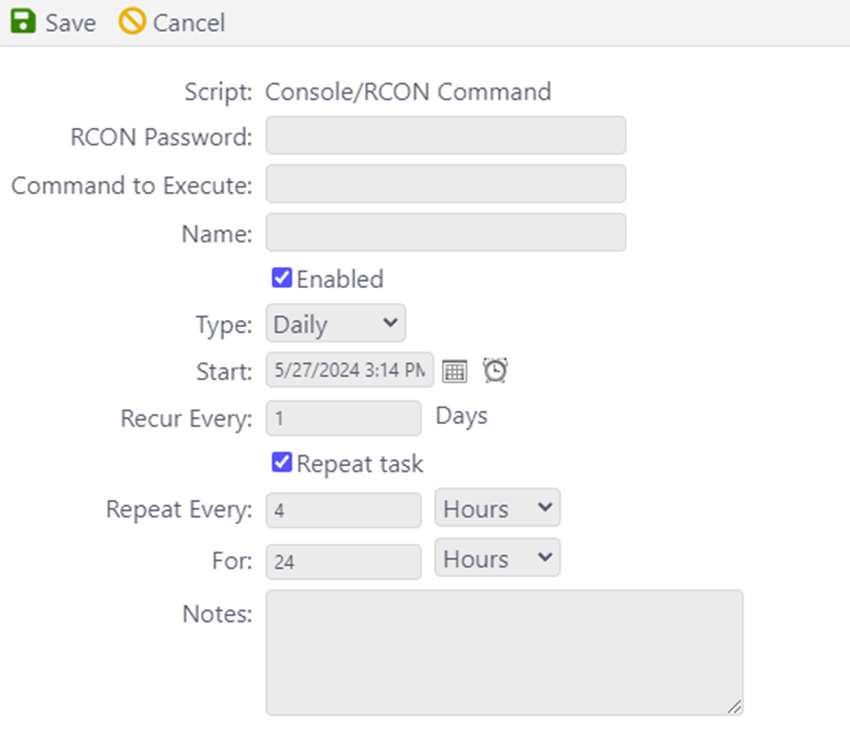
- On the next page, enter the following details:
RCon Password: <YOUR RCON PASSWORD>
Command to Execute: say -1 Server is restarting in 60 minutes
Name: Choose a preferred name for this task
Enabled: Check the box
Type: Daily
Start: Set it to your preference
Recur every: 1 day
Repeat Task: Check the box
Repeat every: 4 hours
For: 24 hours
It should look like this:
- To find the Rcon password, refer to the DZserver.cfg and your active BattlEye config. Remember, the Rcon password must match both cfg files.
- The "Repeat every 4 hours" means that the task will repeat every 4 hours for a total of 24 hours.
- Remember to create multiple tasks for other warning messages, such as a 30-minute warning, 15-minute warning, etc.
- For the Restart task, select the "Scheduled Start/Stop/Restart" task type from the drop-down menu.
If you require any further assistance, please do not hesitate to reach out to Imperium Support or our Discord.
